BizRate Customer Certified (GOLD) Site - SonicGuard.com Reviews at Bizrate

Dell PartnerDirect Premier Partner

Leasing options available! Click here to request more information.

Dell SonicWALL

Dell SonicWALL Scrutinizer

Measure & troubleshoot network performance while increasing productivity.

SonicWALL Scrutinizer

Dell SonicWALL Scrutinizer
SonicWALL Scrutinizer with Flow Analytics Module software license
Scrutinizer with Flow Analytics Module software license for up to 5 nodes
*Includes one year of 24x7 Software Support
01-SSC-4002
List Price: $4,495.00
Call For Lowest Price!
Scrutinizer with Flow Analytics Module software license for up to 25 nodes
*Includes one year of 24x7 Software Support
01-SSC-4003
List Price: $7,995.00
Call For Lowest Price!
Scrutinizer with Flow Analytics Module software license for up to 50 nodes
*Includes one year of 24x7 Software Support
01-SSC-0335
List Price: $12,995.00
Call For Lowest Price!
Scrutinizer with Flow Analytics Module software license for up to 100 nodes
*Includes one year of 24x7 Software Support
01-SSC-0336
List Price: $20,995.00
Call For Lowest Price!
Scrutinizer with Flow Analytics Module software license for up to 150 nodes
*Includes one year of 24x7 Software Support
01-SSC-0337
List Price: $24,995.00
Call For Lowest Price!
Scrutinizer with Flow Analytics Module software license for up to 250 nodes
*Includes one year of 24x7 Software Support
01-SSC-2906
List Price: $32,995.00
Call For Lowest Price!
Scrutinizer with Flow Analytics Module software license for up to 500 nodes
*Includes one year of 24x7 Software Support
01-SSC-2907
List Price: $65,990.00
Call For Lowest Price!

Click here to jump to more modules and pricing!

Overview:

SonicWALL® Scrutinizer is a multi-vendor, application traffic analytics visualization and reporting tool to measure and troubleshoot network performance and utilization while increasing productivity for enterprises and service providers. Scrutinizer supports a wide range of routers, switches, firewalls, and data-flow reporting protocols, providing unparalleled insight into application traffic analysis from IPFIX/NetFlow data exported by SonicWALL firewalls. Scrutinizer easily identifies top applications, conversations, flows, protocols, domains, countries, and subnets, and alerts on suspicious behavior. Scrutinizer also provides historical and advanced reporting, role-based administration, advanced analysis, and threshold-based alerts1, in addition to numerous special features for MSPs and ISPs2.

Visualization tools.

Tools such as customizable and interactive charts and tables; an innovative matrix view displaying flow field; network maps showing relevant flow data; and integrated Google® Maps, are the foundation for Scrutinizer's easy-to-use yet powerful analytics and trend analysis capabilities. These visualization tools provide a robust platform to list top interfaces across all routers, switches, and firewalls, displaying archived flow data in an intuitive and innovative way.

High capacity and broad coverage.

Scrutinizer is able to support hundreds of devices and over a thousand interfaces. It's compatible with many different types of routers, switches and firewalls from numerous vendors and does not require the purchase of a separate, expensive Microsoft® or Oracle® database. Scrutinizer supports all industry standard data flow protocols including NetFlow v5, NetFlow v9, Flexible NetFlow, J-Flow, sFlow and IPFIX.

Flexible analytics and reporting.

IT can perform analysis and create reports based on top hosts, protocols, applications, or conversations on the network across multiple countries, domains, subnets, routers, switches, or firewalls; IP grouping; traffic analysis Report Types (e.g. Flows, Flow Volume, NBAR Support, etc.); or Microsoft® Exchange logs. Scrutinizer can trend in, out, or both at the same time; display data in bits, bytes, packets or percent, down to the second; and filter to include or exclude data on any field exported in the templates (e.g., MAC Address, VLAN, Latency, etcetera).

Enhanced network optimization.

Application traffic analytics increase employee productivity by reporting wasteful network usage for administrators to enhance network optimization.

100% IPFIX and flexible NetFlow support.

Scrutinizer enables administrators to define Application Groups using ranges of applications, ports and IP addresses. Administrators can also apply SonicWALL-specific templates; rename templates; save filters; schedule reports to be sent out via email and .CSV exports for billing; customize billing for usage invoicing, set up default landing pages by account login (useful for service providers servicing multiple customers); and save all records and flows—for an unrestricted amount of time.

Alerts and alarms.

By setting alerts and alarms to activate upon configurable thresholds on interface utilization, administrators can easily identify unfinished flows and nefarious activities. Administrators can proactively monitor Quality of Service (QoS) and receive automatic alerts on degraded voice and video traffic. Scrutinizer's unique index-per-alarm feature displays how many other alarms the host has violated.

Diagnostic troubleshooting.

Troubleshooting tools can be used to identify bottlenecks on the network, analyze latency and jitter, search for specific hosts or ports, determine peak-hour usage and capacity, and identify what devices do not have the Active Timeout configured correctly. Administrators can also create a map of their network with links that change color based on utilization. Scrutinizer provides diagnostic information on host flows, host volume, pair volume MAC addresses, VLANs, domains and countries. In addition, the solution leverages IPFIX statistics to provide greater insight into VoIP metrics (codec, caller ID, duration, originator, destination, etc.).

Enhanced forensics analysis.

Administrators can configure timeframes for DNS caching; filter host-to-host, subnet-to-subnet or by TCP flag; track Flow Sequence Number, trend results and indicate problems; and specify allowed subnets and alarm for rogue IP addresses. Scrutinizer detects and alerts on unauthorized applications; malicious traffic; known-compromised internet hosts; DNS cache poisoning; rogue DHCP and mail servers; port scanning; excessive multicast traffic; HTTP hijacking; and DDOS attacks.

Flexible administration.

Administration is a breeze with the central, easy-to-use console. Dashboards can be customized per login or group-based user permissions. Administrators can configure permissions per login account to access flows for specific router, switch, and firewall interfaces. Service providers can easily modify style sheets to match branding.

1 These features require the Flow Analytics Module.
2 Available in the Service Provider Module.

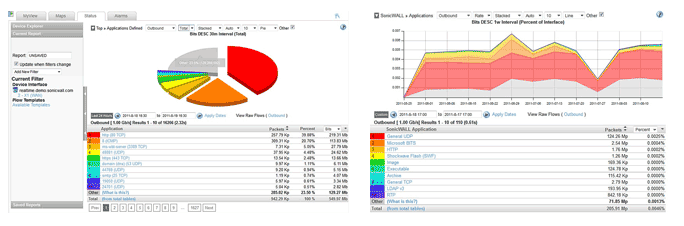
Screenshots:


Add-on Modules

Bring your analytics solution to the next level with Scrutinizer Add-On Modules

Flow Analytics Module:

The SonicWALL® Flow Analytics Module brings traffic flow diagnostics to the next level by adding valuable functionality to SonicWALL Scrutinizer software, such as historical reporting for an unrestricted period of time, advanced alarming with the ability to set thresholds, role-based administration, and in-depth traffic analysis algorithms. With the Flow Analytics Module, Scrutinizer can easily identify top applications, conversations, flows, protocols, domains, countries, and subnets on the network, as well as watch for and alert on suspicious or potentially hazardous network behavior patterns, thereby providing administrators with greater network security awareness. Benefits include:

Flexible reporting.

The Flow Analytics Module adds advanced reporting options such as flow volume, MPLS by subnet, Microsoft Exchange log trending and NBAR support. Administrators have with a wealth of information right at their fingertips.

Custom reports.

IT administrators can create custom reports by applying filters to granularly define the specific information desired. Once created, custom reports can be saved for later use.  Custom reports allow the user to configure detailed reports by filtering on fields such as IP Addresses, ranges and subnets; port numbers and ranges; defined applications including ranges of protocols and groups of protocols; multiple interfaces from different routers and switches; any exported field available via NetFlow or IPFIX; dynamic QoS monitoring; and detailed security/forensic information

Traffic analysis reports.

The Flow Analytics Module adds several additional flow based traffic analysis report types. Examples include granular IPFIX based application visualization reports for SonicWALL products; flexible NetFlow NBAR based application reports (requires IOS v15 on Cisco routers); conversations to/from host pairs and applications used; flow reports with ToS field; host flow reports to show hosts sending or receiving the most flows; host volume reports to show the volume of unique hosts per second; and pair volume reports to show the volume of unique to/from address pairs per second.

Set It and Forget It alerting.

The Flow Analytics Module provides administrators with greater automation control, making routine advanced reporting a snap. Alerts can be configured based upon everything from unfinished flows to specific interface utilization. Administrators can configure QoS thresholds to proactively be alerted of RTSP latency and jitter before end users even reports a problem. Using saved Scrutinizer reports, the Flow Analytics Module can monitor and send out syslogs when traffic patterns violate specified thresholds.

Enhanced security awareness.

The enhanced security functionality alone makes Scrutinizer with Flow Analytics an invaluable tool in an administrator’s arsenal. It shows exactly what is happening on the network—where traffic originated, where it is going and what type of traffic it is. Is someone planning an attack by scanning the corporate network? Did one of the servers get infected with malware and launch a DDoS attack? Scrutinizer can automatically detect nefarious activities and alert administrators immediately.

Advanced troubleshooting.

Valuable troubleshooting tools allow Scrutinizer to easily identify the volume of flows per hosts and peer into Voice over IP (VoIP) traffic. IT administrators can analyze VoIP traffic and determine the amount of voice traffic into and out of the network over time; what users are involved with the most VoIP traffic; the caller ID of destination and source; QoS statistics such as Latency/Jitter and packet loss of each call; what audio codec is being utilized; and whether the router is modifying DSCP values.

Network topology maps.

Network topology maps come to life in Scrutinizer as links change in color and thickness with variations in network utilization. Clicking on a link in a network topology map brings up useful traffic statistics such as top talkers and top conversations within the last minute.

Google maps.

IT administrators can use Scrutinizer to plot network appliances such as firewalls, routers, and switches on a Google map embedded in the Scrutinizer application. Using this geographic map as a starting point into all network analysis provides traffic details collected and organized for easy visualization in Scrutinizer.

Service Provider Module:

The SonicWALL® Service Provider Module (only available as an add-on for SonicWALL Scrutinizer with the Flow Analytics Module,) adds several features that are especially useful for Managed Service Providers (MSPs) and Internet Service Providers (ISPs). Benefits include:

Easy customization.

Administrators can easily customize permissions, modify style sheets and default landing pages with the Service Provider Module. Several default sheets are even included.

Customizable billing solutions.

The SonicWALL Service Provider Module enables customizable invoicing and billing solutions based on actual network usage, and eases data export to Microsoft Excel in .CSV format.

Enablement of traffic and usage based billing.

The Scrutinizer Service Provider Module allows service providers to export flow data based on any flow (NetFlow, IPFIX, sFlow, etcetera) field or combination of flow fields including rate per second, packets, total bits, IP addresses, ToS (DSCP), or BGP autonomous system (AS) number. This data can then be used to invoice end customers based on actual network usage rather than WAN connection speed.

Increased invoicing options.

The Service Provider Module routinely exports a custom .CSV file with all the required details.  For example, it allows billing based on a flat rate versus a burst rate as well as total amount transferred per month. More traditional billing is also possible, for example, where the end customer pays based on the 95% percentile technique.

Customized reporting options.

Using the intuitive configuration interface, any saved report in Scrutinizer can become the basis for an export. To ensure the highest accuracy, data is gathered from the raw flow data tables. The Service Provider Module also includes the following capabilities:

  • Any NetFlow field or range within a field is saved as part of the filter within a report.
  • The entire contents of any report type can be emailed or exported in CSV format.
  • Exports occur on a periodic basis.
  • Rolling the data into larger intervals is possible.
  • Exports are emailed or saved in a directory with a custom name and time stamp.
  • Scheduled routines:
    • Prepare the data for further processing
    • Write the data to another server

Mashups for easy accessibility. Utilizing simple web technology, Scrutinizer allows anyone to easily assemble a URL into a mashup or third party application to directly import and display important information regarding the activity of a specific host or application on your network into the Scrutinizer dashboard. 

Customer portal.

IT administrators can choose to provide end users are with secure login access to the flow data generated by their network devices. End users can also use the customer portal to troubleshoot bandwidth usage and identify/analyze odd traffic patterns. Additionally, automatic HTML reports can be scheduled for each end customer. Service providers can use the portal as a message board to communicate with their customers as well as integrate other applications into the MyView interface.

Cisco Advanced Reporting Module:

The SonicWALL® Scrutinizer Cisco Advanced Reporting Module is a value added performance monitoring and reporting solution for Cisco Medianet that enables granular troubleshooting of choppy voice and video media. IT staff can easily use this module to troubleshoot issues related to video or voice by using Scrutinizer to analyze the appropriate flow.

With the Scrutinizer Cisco Advanced Reporting Module, Scrutinizer can be configured to analyze and alert on excessive amounts of one or a combination of the following parameters:

  • Round Trip Time
  • Jitter
  • Packet Loss
  • Bits, Bytes and Packets
  • MAC Addresses, IP Addresses
  • VLANs
  • Domains
  • Applications
  • Interface

Compare Products:

Legend:

  • Standard Standard
  • Optional Optional
  • not available Not Available
Capacity & Visualization
  Trial Scrutinizer Flow Analytics Module Flow Analytics and Service Provider Modules
Archived Data Up to 24 Hours Unrestricted Unrestricted
When combined with report archiving provides a platform for trend analysis. Up to 24 Hours Standard Standard
List the top interfaces across all routers, switches and firewalls Limited to 5 Interfaces Standard Standard
Compatible with numerous vendors Standard Standard Standard
Capable of handling up to 20,000 flows per second in v8.X Standard Standard Standard
Does not require Expensive Microsoft® Database Standard Standard Standard
Support for over 1000 exporters & over 1000 Interfaces Standard Standard Standard
Flow View to see all fields in the raw flows. Standard Standard Standard
Integration with Google Maps Standard Standard Standard
Matrix View Function Standard Standard Standard
Flexible Reporting
  Trial Scrutinizer Flow Analytics Module Flow Analytics and Service Provider Modules
Schedule reports to be emailed not available Standard Standard
100% support for Flexible NetFlow by breaking out details per template Standard Standard Standard
Ability to include and exclude data using filters Standard Standard Standard
Ability to rename templates for future reference Standard Standard Standard
Definable default landing page per customer logs in. Standard Standard Standard
Define Application Groups using ranges of ports and IP addresses Standard Standard Standard
Display data in bits, bytes, packets or percent Standard Standard Standard
Granularity down to the second it was received using FlowView Standard Standard Standard
Include or exclude filters Standard Standard Standard
Create reports based upon IP Groupings Standard Standard Standard
Report per interface on top hosts, protocols, applications, conversations and more Standard Standard Standard
Save Filters on custom reports Standard Standard Standard
Support for at least 9 languages Standard Standard Standard
Trend in, out or both at the same time, in all reports Standard Standard Standard
Ability to add multiple interfaces across multiple routers, switches, or firewalls to single report Standard Standard Standard
Filter on any field exported (e.g. MAC Address, VLAN, Latency, etc.) in the templates Standard Standard Standard
Reports on the amount of traffic being dropped by collector, thus providing greater accuracy than competitors Standard Standard Standard
Adds several additional traffic analysis Report Types (e.g. Flows, Flow Volume, NBAR Support, etc.). not available Standard Standard
Easily identify top appplications on the networkw across numerous network devices not available Standard Standard
MPLS reporting by subnets not available Standard Standard
Report and trend on Microsoft® Exchange logs not available Standard Standard
Saves all the records, all the flows, all the time for as long as necessary including indefinitely not available Standard Standard
Create reports based upon top countries, domains or subnets not available Standard Standard
SonicWALL specific reporting templates not available Standard Standard
Reports exportable to .CSV format not available not available Standard
Customizable billing solutions for over usage and invoicing. not available not available Standard
Alerting
Trial Scrutinizer Flow Analytics Module Flow Analytics and Service Provider Modules
Alarm for unfinished flows and nefarious activities not available Standard Standard
Alarm on saved filters (e.g. total traffic or per row) not available Standard Standard
Alarming for high interface utilization not available Standard Standard
Any saved report in Scrutinizer can be configured with a threshold to trigger an alarm. not available Standard Standard
Unique index per alarm (tells how many other alarms the host has violated) not available Standard Standard
Offers administrators the ability to proactively monitor QoS and become automatically alerted of degraded voice / video traffic not available Standard Standard
TroubleShooting
Trial Scrutinizer Flow Analytics Module Flow Analytics and Service Provider Modules
Ability to click on the links in the map to bring up the top conversations Standard Standard Standard
Excellent troubleshooting tool for helping administrators identify 'slowness' on the network Standard Standard Standard
Latency/ Jitter Analysis on nProbe only Standard Standard Standard
Mapping of network with links that change color based on utilization Standard Standard Standard
Search for specific hosts or ports Standard Standard Standard
Identifies what devices do not have the Active Timeout configured correctly. Standard Standard Standard
Capacity planning tool for system admins to determine usage during peak hours not available Standard Standard
Host Flows (volume of flows per host) not available Standard Standard
Host Volume (volume of unique hosts per second) not available Standard Standard
Pair Volume (Volume of unique to/from address pairs) not available Standard Standard
Leverages IPFIX statistics to provide greater insight into VoIP metrics (codec, caller ID, duration, originator, destination, etc.) not available Standard Standard
Security
Trial Scrutinizer Flow Analytics Module Flow Analytics and Service Provider Modules
Configurable time frame for DNS caching Standard Standard Standard
Filter for "Host to Host" and "Subnet to Subnet" Standard Standard Standard
Ability to filter traffic based upon TCP Flag Standard Standard Standard
Keeps track of the Flow Sequence Number, trends results and indicates problems Standard Standard Standard
Run reports to find rogue DNS, DHCP, mail, etc., servers on the network Standard Standard Standard
Alert & Detection of banned applications (e.g. BitTorrent P2P, FTP, YouTube, Facebook, Skype, etc not available Standard Standard
Alert & Detection of malicious traffic (e.g. worms, viruses), known compromised internet hosts, illegal IP addresses, excessive Multicast traffic, HTTP hijacking, DNS Cache poisoning, Rouge DHCP servers, DDoS attacks, etc not available Standard Standard
Alert & detection of Scanning: SYN, NULL, FIN, XMAS etc not available Standard Standard
Specify allowed subnets and alarm for rogue IP addresses not available Standard Standard
Administration
Trial Scrutinizer Flow Analytics Module Flow Analytics and Service Provider Modules
Customizable MyView dashboards per login Standard Standard Standard
Group based user permissions Standard Standard Standard
Configure permissions per login account for access to flows for specific router, switch, firewall interfaces. not available not available Standard
Style sheets easily modified with several defaults to change the colors, fonts, and logos to match the Service Providers marketing efforts. not available not available Standard
Supported Protocols & Other Technical Specifications
Trial Scrutinizer Flow Analytics Module Flow Analytics and Service Provider Modules
First of its kind IPFIX implementation into a firewall appliance Standard Standard Standard
Ability to view individual flow templates (NetFlow v9 and Flexible NetFlow) Standard Standard Standard
Allows integration of 3rd party applications and URLs into mashups Standard Standard Standard
Customize interface names and overwrite default SNMP ifAlias name Standard Standard Standard
Customize interface speed, both in and out, with different values Standard Standard Standard
Exclude transport protocols from being saved per interface, router or globally (very important feature when VPNs and tunnels are involved). Standard Standard Standard
Identify interface names using NetFlow or SNMP. Standard Standard Standard
Integration with any 3rd party NMS solutions Standard Standard Standard
LDAP support Standard Standard Standard
Listen for flows on unlimited UDP ports Standard Standard Standard
Support for IPv6 Standard Standard Standard
Support for NetFlow v1, v5, v6, v7, v9, jFlow, sFlow (v2, v4, v5), SNMP(v1, v2, v3) and IPFIX Standard Standard Standard
Filter for Nexthop not available Standard Standard
Support for FnF NBAR and IPFIX performing deep packet inspection to identify Layer 7 application traffic not available Standard Standard
DNS resolution becomes automated and a constant process. not available Standard Standard

Specifications:

Recommended Deployment:

  • Processor: x64 Quad Core 2GHz
  • Memory: 8GB Ram
  • Storage: 50GB HDD (IDE or SATA)
  • Operating System: Windows Server 2008 64-bit (R2) (Any Edition)

Minimum Requirements:

  • Processor: x64 Dual Core 2.2GHz
  • Memory: 4GB RAM
  • Storage: 50GB HDD (IDE or SATA)
  • Operating System: Windows Server 2008 64-bit (SP2) Any Edition, Windows 7 64-bit Professional or Enterprise, Windows Vista 64-bit Professional or Enterprise

SonicWALL Scrutinizer Part Numbers:

Dell SonicWALL Scrutinizer
SonicWALL Scrutinizer with Flow Analytics Module
Scrutinizer with Flow Analytics Module software license for up to 5 nodes
*Includes one year of 24x7 Software Support
01-SSC-4002
List Price: $4,495.00
Call For Lowest Price!
Scrutinizer with Flow Analytics Module software license for up to 25 nodes
*Includes one year of 24x7 Software Support
01-SSC-4003
List Price: $7,995.00
Call For Lowest Price!
Scrutinizer with Flow Analytics Module software license for up to 50 nodes
*Includes one year of 24x7 Software Support
01-SSC-0335
List Price: $12,995.00
Call For Lowest Price!
Scrutinizer with Flow Analytics Module software license for up to 100 nodes
*Includes one year of 24x7 Software Support
01-SSC-0336
List Price: $20,995.00
Call For Lowest Price!
Scrutinizer with Flow Analytics Module software license for up to 150 nodes
*Includes one year of 24x7 Software Support
01-SSC-0337
List Price: $24,995.00
Call For Lowest Price!
Scrutinizer with Flow Analytics Module software license for up to 250 nodes
*Includes one year of 24x7 Software Support
01-SSC-2906
List Price: $32,995.00
Call For Lowest Price!
Scrutinizer with Flow Analytics Module software license for up to 500 nodes
*Includes one year of 24x7 Software Support
01-SSC-2907
List Price: $65,990.00
Call For Lowest Price!
SonicWALL Scrutinizer with Flow Analytics Module Software Upgrades
Scrutinizer with Flow Analytics Module from 5 to 25 nodes software upgrade 01-SSC-4401
List Price: $3,850.00
Call For Lowest Price!
Scrutinizer with Flow Analytics Module from 5 to 50 nodes software upgrade 01-SSC-0339
List Price: $9,350.00
Call For Lowest Price!
Scrutinizer with Flow Analytics Module from 5 to 100 nodes software upgrade 01-SSC-0340
List Price: $18,150.00
Call For Lowest Price!
Scrutinizer with Flow Analytics Module from 5 to 150 nodes software upgrade 01-SSC-0338
List Price: $22,550.00
Call For Lowest Price!
Scrutinizer with Flow Analytics Module from 5 to 250 nodes software upgrade 01-SSC-3791
List Price: $31,350.00
Call For Lowest Price!
Scrutinizer with Flow Analytics Module from 25 to 50 nodes software upgrade 01-SSC-0355
List Price: $5,500.00
Call For Lowest Price!
Scrutinizer with Flow Analytics Module from 25 to 100 nodes software upgrade 01-SSC-0356
List Price: $14,300.00
Call For Lowest Price!
Scrutinizer with Flow Analytics Module from 25 to 150 nodes software upgrade 01-SSC-0357
List Price: $18,700.00
Call For Lowest Price!
Scrutinizer with Flow Analytics Module from 25 to 250 nodes software upgrade 01-SSC-3792
List Price: $27,500.00
Call For Lowest Price!
Scrutinizer with Flow Analytics Module from 50 to 100 nodes software upgrade 01-SSC-0358
List Price: $8,800.00
Call For Lowest Price!
Scrutinizer with Flow Analytics Module from 50 to 150 nodes software upgrade 01-SSC-0359
List Price: $13,200.00
Call For Lowest Price!
Scrutinizer with Flow Analytics Module from 50 to 250 nodes software upgrade 01-SSC-3793
List Price: $22,000.00
Call For Lowest Price!
Scrutinizer with Flow Analytics Module from 100 to 150 nodes software upgrade 01-SSC-0399
List Price: $4,400.00
Call For Lowest Price!
Scrutinizer with Flow Analytics Module from 100 to 250 nodes software upgrade 01-SSC-3794
List Price: $13,200.00
Call For Lowest Price!
Scrutinizer with Flow Analytics Module from 150 to 250 nodes software upgrade 01-SSC-3795
List Price: $8,800.00
Call For Lowest Price!
SonicWALL Scrutinizer with Flow Analytics Module 24x7 Support
Scrutinizer with Flow Analytics Module 24x7 Software Support for 5 nodes, 1 Year 01-SSC-4511
List Price: $899.00
Our Price: $674.95
Scrutinizer with Flow Analytics Module 24x7 Software Support for 25 nodes, 1 Year 01-SSC-4512
List Price: $1,599.00
Our Price: $1,199.95
Scrutinizer with Flow Analytics Module 24x7 Software Support for 50 nodes, 1 Year 01-SSC-2889
List Price: $2,599.00
Our Price: $1,949.95
Scrutinizer with Flow Analytics Module 24x7 Software Support for 100 nodes, 1 Year 01-SSC-2896
List Price: $4,199.00
Our Price: $3,149.95
Scrutinizer with Flow Analytics Module 24x7 Software Support for 150 nodes, 1 Year 01-SSC-2898
List Price: $4,999.00
Our Price: $3,749.95
Scrutinizer with Flow Analytics Module 24x7 Software Support for 250 nodes, 1 Year 01-SSC-3931
List Price: $6,599.00
Our Price: $4,949.95
Scrutinizer with Flow Analytics Module 24x7 Software Support for 500 nodes, 1 Year 01-SSC-3932
List Price: $13,198.00
Our Price: $9,898.95